Before we write a page for a client, we look hard at the ten pages Google already ranks for it: how long they are, what they cover, what kind of page they are, what schema they carry, which of them the AI Overview quotes. That used to mean opening ten tabs. Now it is one button under each result.
It is the sister of SEO Readout, our free on-page checker. SEO Readout judges one page. Rank Readout judges the search.
On every result
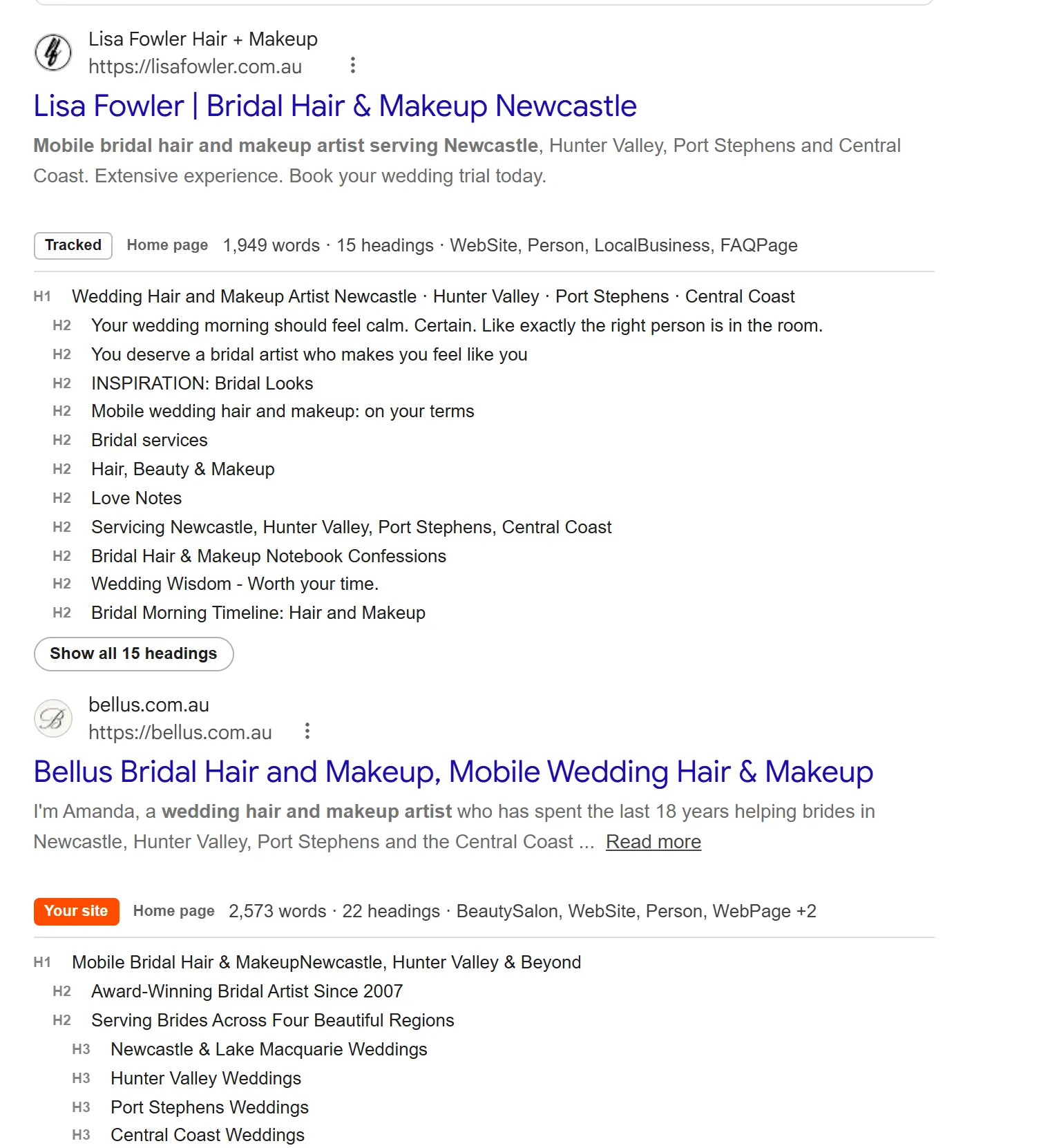
- The outline. Every H1 to H6 of the result's page, indented, under the result itself. Press Outline on one result, or Outline top 10 for the lot.
- The vital signs. Word count, images, schema types, and the published or updated date.
- Google rewrote this title. The page's real title beside the one Google shows, so you can see when Google did not like yours.
- Needs JavaScript. A page that sends almost no text before its scripts run is flagged, instead of showing an empty outline as if it had no headings.
- The page type. Service page, home page, blog post, product, directory, forum, news and the rest, with the reason on hover.
- Cited in AI Overview. Marked on any result whose site the AI Overview links to.
Where your site landed
- Your position on every search. Set your website once and every search shows its organic position and its place in the map pack, with your result tagged.
- Competitors beside you. Track up to ten sites the same way.
- Pages 2 to 5. Not on page 1? One click opens Google's page 2, as if you clicked it, and the count carries across pages. A result Google repeats at the top of the next page is counted once.
- Suburb searches. Set a base search and your suburbs, then click through "bridal makeup maitland", "bridal makeup cessnock" and the rest. A table in the side panel shows where you landed on each: the searches suburb pages exist to win.
What ranks here
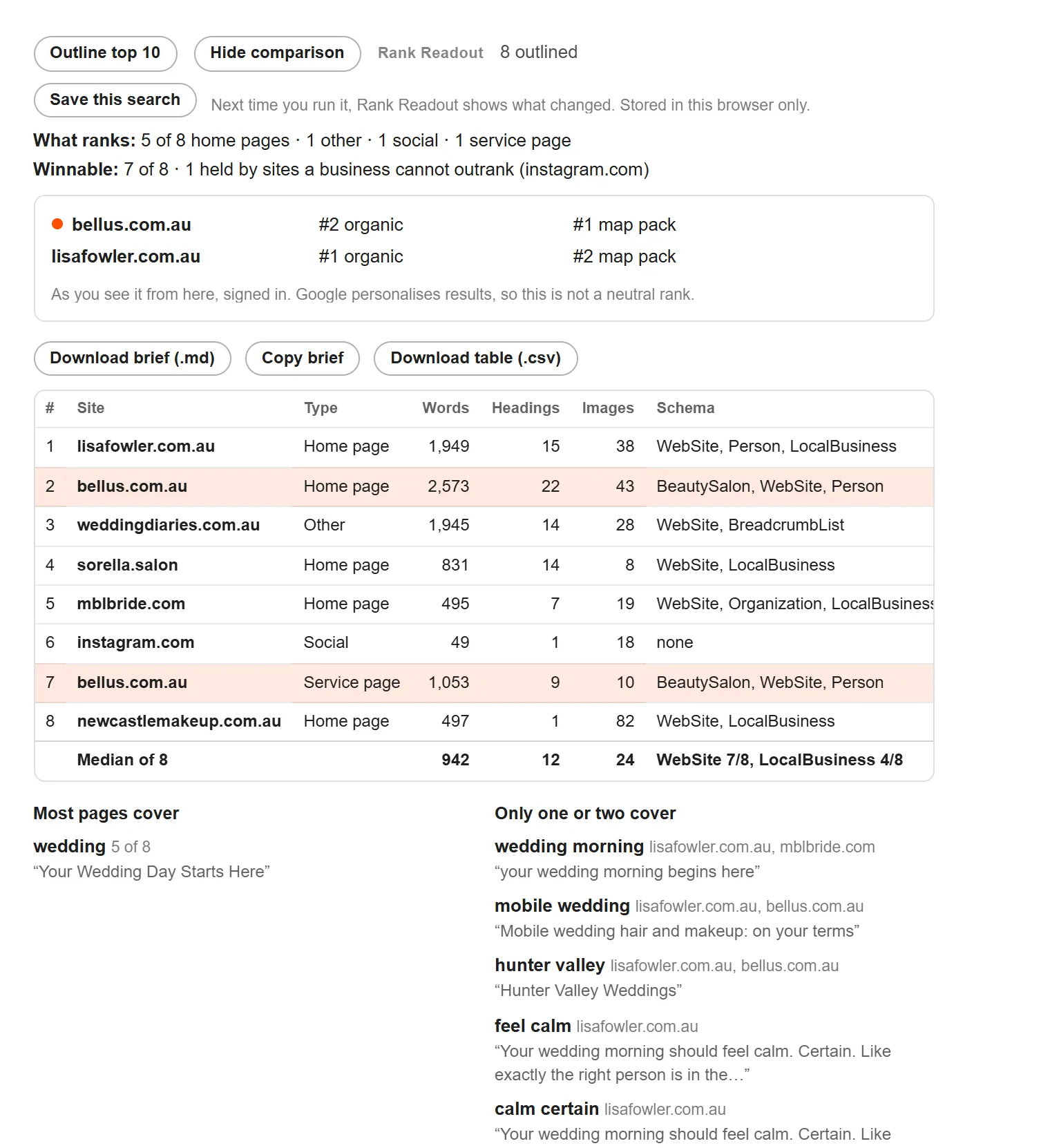
- What kind of page wins. "7 of 10 are service pages." Know what to build before you write a word.
- How many spots are winnable. Directories, marketplaces, social sites, forums, news and government results are counted and named, because a business site will not take their place.
- The comparison. The top results side by side: words, headings, images, schema, date, star ratings and sitelinks, with a median row so you can see what a page here usually looks like.
- The topics. What nearly every page has a heading for, and what only one or two cover. The first list is the floor; the second is where a page can be different.
- The AI Overview's sources, and whether each one also ranks. Some do not rank at all.
- The map pack. Rating, reviews, main category, and whether each business's website ranks too. Paid listings are set apart, not counted.
- People Also Ask and related searches, collected.
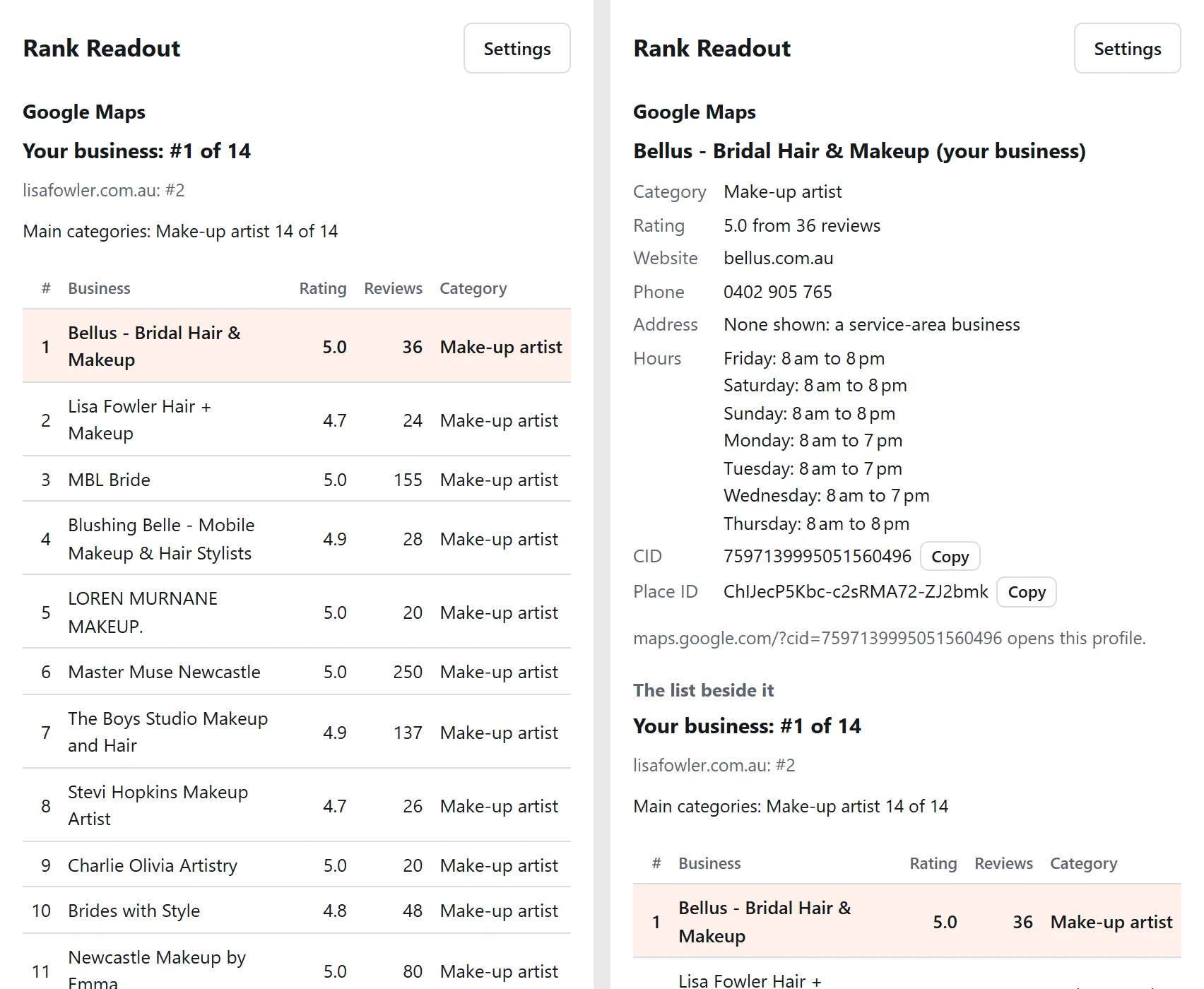
Google Maps
Open the side panel on Google Maps for your position in the results list (ads not counted), your competitors', and the main categories the winners use. On a business profile it reads the rating, reviews, phone, hours, and the CID and Place ID, with a copy button for each.
What changed
Save a search and Rank Readout keeps a snapshot each time you run it. Next time the bar says, for example, "Since 12 Oct: yours #12 → #9 · 2 new · 1 dropped · AI Overview sources +1", and the Changes view lists who moved, who is new and who dropped out. It is your own rank history, kept in your browser, built from the searches you actually ran.
Export
Download a content brief as Markdown, ready to write from: the median page, the top results, the common topics and the gaps, People Also Ask, the AI Overview's sources and every outline. Or the comparison table as CSV for a spreadsheet.
What it never does
- Search Google for you in the background. Every search it opens is one you clicked, one at a time.
- Fetch anything before you press a button.
- Send your searches or anything else to a server. There is no server.
- Open a tab on install, show a changelog, or ask for a rating. Safe to open in front of a client.
Privacy
Rank Readout does not collect anything. There is no account, no analytics, no telemetry, no error reporting and no server. We cannot see what you search for, because nothing is ever sent to us.
What it reads. The Google results page you are looking at, on google.com and google.com.au: the results, the map pack, the AI Overview's links, People Also Ask and the related searches. On Google Maps, the results list or the business profile you have open. It reads what is already on your screen. (Signed out of Google, the results' addresses are not on the page, so there is nothing to outline; it says so rather than guessing.) It never searches Google for you in the background, and it never fetches a Google page.
What it requests, and only when you press a button. When you pressOutline or Outline top 10, it downloads those result pages, straight from your browser to each site, without your cookies, so it can read their headings, word count, schema and dates. That is the only time it contacts anyone. Chrome asks your permission the first time, and you can take it back on the settings page or in chrome://extensions whenever you like.
What it opens. A few buttons open an ordinary Google search in your tab, exactly as if you had typed it: Check page 2,Next suburb, and Run again on a saved search. Each press is one search. Nothing happens on its own.
What it stores, all in your own browser:
- your settings: your website, your business name, the sites you track, and the suburbs for suburb searches;
- the searches you choose to save, with a snapshot of the results each time you run them (positions, links, titles, the AI Overview's sources and the map pack names; never page content), up to 10 per search and 200 searches;
- the suburb searches table;
- for as long as the browser is open: the outlines you have loaded (half an hour), the pages 2–5 count for a search (an hour) and what your Maps tabs are showing.
Searches you have not saved are not stored. Nothing is synced to your Google account.
What it saves to your computer. Only what you ask for: the content brief (Markdown) and the comparison table (CSV), through Chrome's ordinary download.
Permissions. storage (the settings and saved searches above), sidePanel (the panel that stays open beside the results), and, only once you allow it, permission to read the pages in your results so they can be outlined. It runs on Google results and Google Maps pages and nowhere else.
Third parties. None. No fonts, scripts or images are loaded from anyone else's servers, and the result pages it outlines are read in your browser and go nowhere.
Changes. If any of this ever changes, the extension's version number will change with it and this page will say what changed and when. Questions: admin@newcastlewebco.com.au. Last updated 17 October 2026, version 1.0.1.
Why a web studio gives this away
This is how we research a page before we build it, and a business owner can now do the same research in a minute and see what we would see. Some will write the page themselves. Some will ask us to. Both are fine. If the comparison says your page is a long way off the median, our SEO work in Newcastle starts with exactly this table, and if the suburb table is mostly blank, that is what suburb pages are for.
Questions
Is Rank Readout really free?
Yes. There is no paid tier, no trial, no account and no licence key, the same as SEO Readout. It is the tool we use on every search we research for a client, and giving it away costs us nothing but the time it took to build.
Does it search Google for me in the background?
No, never. Google's spam policies count automated searches for rank checking as machine-generated traffic, and the penalty lands on the person whose browser sent them. Rank Readout reads the results page you are already looking at. Its Check page 2, Next suburb and Run again buttons each open one ordinary Google search, the same as typing it, one press at a time.
Why does it ask to read every site when I press Outline?
To outline a result it has to download that result's page, and the result could be on any site. Chrome asks you once, the first time you press Outline, and you can take it back on the settings page. The download goes straight from your browser to that site without your cookies. Nothing goes to us, and nothing is fetched until you press the button.
Is the position it shows my real ranking?
It is your ranking as you see it, from where you are, signed in. Google personalises results by location and history, so two people in different suburbs see different pages. That is the honest thing to measure for a local business, and it is why the extension says so on every search rather than calling it a neutral rank.
Why can't I outline results when I'm signed out of Google?
Signed out, Google sends every result link through an encrypted redirect and leaves the real address off the page, so there is no page to download. Rank Readout says so instead of guessing. Positions, page types, the map pack, Google Maps and saved searches all still work signed out; outlines and AI Overview sources need you signed in.
Get it. It is on the Chrome Web Store, free, no account. Click Add to Chrome, then search Google as usual.
How to use Rank Readout
- Install it. Add it from the Chrome Web Store, then pin the icon from the puzzle-piece menu so the side panel is one click away.
- Set your site. On any Google search press Set your site, or open the extension's settings. Enter your website, your business name as it shows on Google Maps, and up to ten competitors.
- Search Google as you normally would. Above the results you will see where your site landed, organic and in the map pack, what kind of page ranks, how many spots are winnable, and whether there is an AI Overview.
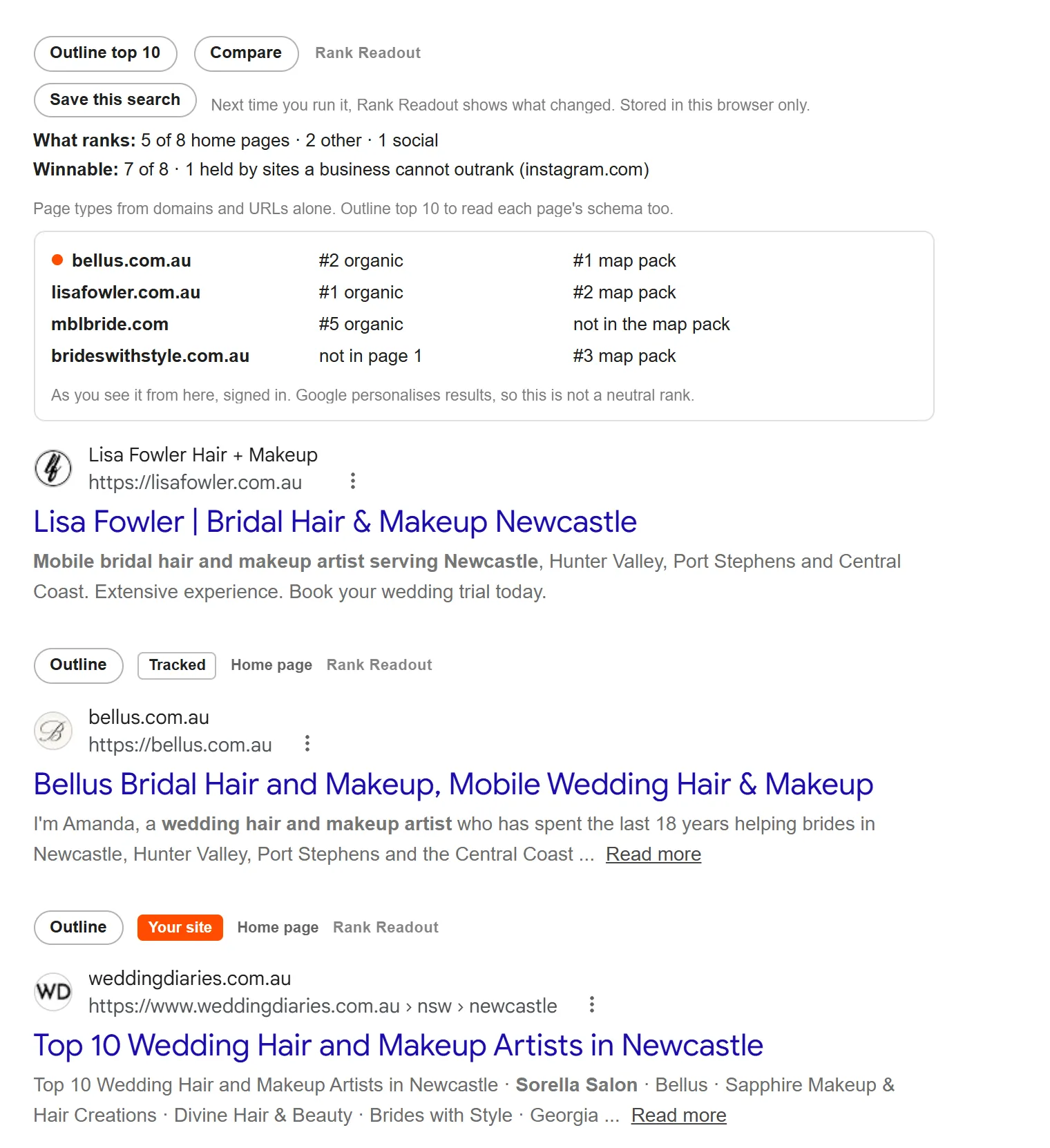
- Outline a result. Press Outline under one result, or Outline top 10 for all of them. The first time, Chrome asks for permission to read result pages and warns that the extension can read sites you visit. That is expected: it is the only way to download a result's page. It is asked once, used only when you press Outline, and can be taken back in the settings.
- Compare. Press Compare for the top results side by side with a median row, the topics most pages cover and the ones only one or two do, the AI Overview's sources and the map pack. Download brief saves it all as Markdown to write from; Download table saves a CSV.
- Not on page 1? Press Check page 2. It opens Google's next page, as if you clicked it, and keeps counting up to page 5.
- Save the search. Press Save this search. Run it again in a few days and the bar says what changed: who moved, who is new, who dropped out. The side panel lists your saved searches with your position each time.
- Check your suburbs. In the settings, add a base search ("bridal makeup") and your suburbs. Search the base, press Start suburb searches, then Next suburb after each one. The table builds in the side panel.
- Use it on Google Maps. Search on Google Maps and click the Rank Readout icon to open the side panel: your place in the list, your competitors', the main categories. Open a business and the panel shows its details, with copy buttons for the CID and Place ID.
If something does not show
- Nothing under the results. Reload the Google tab once after installing. It runs on google.com and google.com.au, on the All tab.
- "No outline while signed out". Sign in to Google. Signed out, Google hides the results' addresses, so there is no page to read.
- "The site blocked the read". Some sites refuse anything that is not a full browser visit. Open the result to see the page.
- A position looks different from a colleague's. Google personalises results by location and account; Rank Readout shows yours.