





An Astro website is fast because every page is built ahead of time and sent as a finished file. The catch people raise is the obvious one: if there is no WordPress-style admin behind it, how does the owner change a price or swap a photo? The answer is a CMS that sits beside the site rather than under it. Here is what that means, which one we chose and why, what it looks like to a business owner, and what we found when we tested it on a real site before putting it in every package.
The CMS we put on Astro sites is Keystatic. It gives the owner an editor at their own web address where they change words, photos, opening hours and questions, then save. The change is stored in the site's own files, the site rebuilds itself, and it is live in about a minute. The public pages stay finished files with no admin code in them, so the site keeps the speed and security that made Astro worth choosing. Keystatic is free, and its sign-in service is free for up to three editors per site.
What is a CMS?
A CMS, short for content management system, is the part of a website that lets someone change the words and pictures without touching code. On WordPress it is the dashboard you log in to at /wp-admin. On Wix and Squarespace it is the whole product: the editor and the website are the same thing. Either way, the job is the same: a form for the content, a save button, and the change appears on the site.
Where they differ is what happens when a visitor arrives. A WordPress page is assembled by the server on every visit, from a database, a theme and a stack of plugins, which is why it needs constant updates and why a slow plugin slows every page. An Astro page was built once, in advance, so there is nothing to assemble and nothing on the server to attack.
Why an Astro site needs one added
Astro is a way of building websites, not a website product, so it does not arrive with an editor. The content lives in plain files inside the site: text in Markdown and data files, photos in a folder. A developer edits those files and the site rebuilds. That is perfect for us and useless for a business owner who wants to change their Saturday hours.
So an Astro CMS is a separate tool that edits those same files through a friendly screen. There are several. Keystatic, Decap and TinaCMS are the ones you will see most often, and some services host an editor for you at a monthly fee. They all solve the same problem in slightly different ways, and the differences matter more to the person maintaining the site than to the person typing in it.
Why we chose Keystatic
We tested the options against what our clients actually need, and Keystatic came out ahead on five things that matter to a small business site.
- The content stays in the site. Every change is saved into the site's own files and recorded in its history, so any edit can be seen and undone, and there is no separate database to back up or lose.
- Photos go through the same optimisation as the rest of the site. A photo uploaded in the editor is resized and converted into modern formats when the site builds, exactly like the photos we put there, so an owner's 6 MB phone photo does not slow the page down.
- Nothing reaches the public pages. The editor loads only at its own address. A visitor reading your services page downloads none of it, so the speed score does not move.
- An email login. Keystatic Cloud, its sign-in service, lets an owner log in with an email address rather than a developer account, and it only has access to the one website it was set up for.
- It costs nothing to run. Keystatic is free software, and Keystatic Cloud is free for up to three editors on a site. That is why we can include it in every package without adding a monthly fee.
What it looks like to a business owner
The editor lists your pages down the left in the same order as your site's menu: the home page, your services, your about page, then your area pages and your business details. Open one and you see its words, its photos and its questions as labelled boxes, each with a line explaining what it is for and where it shows on the site.
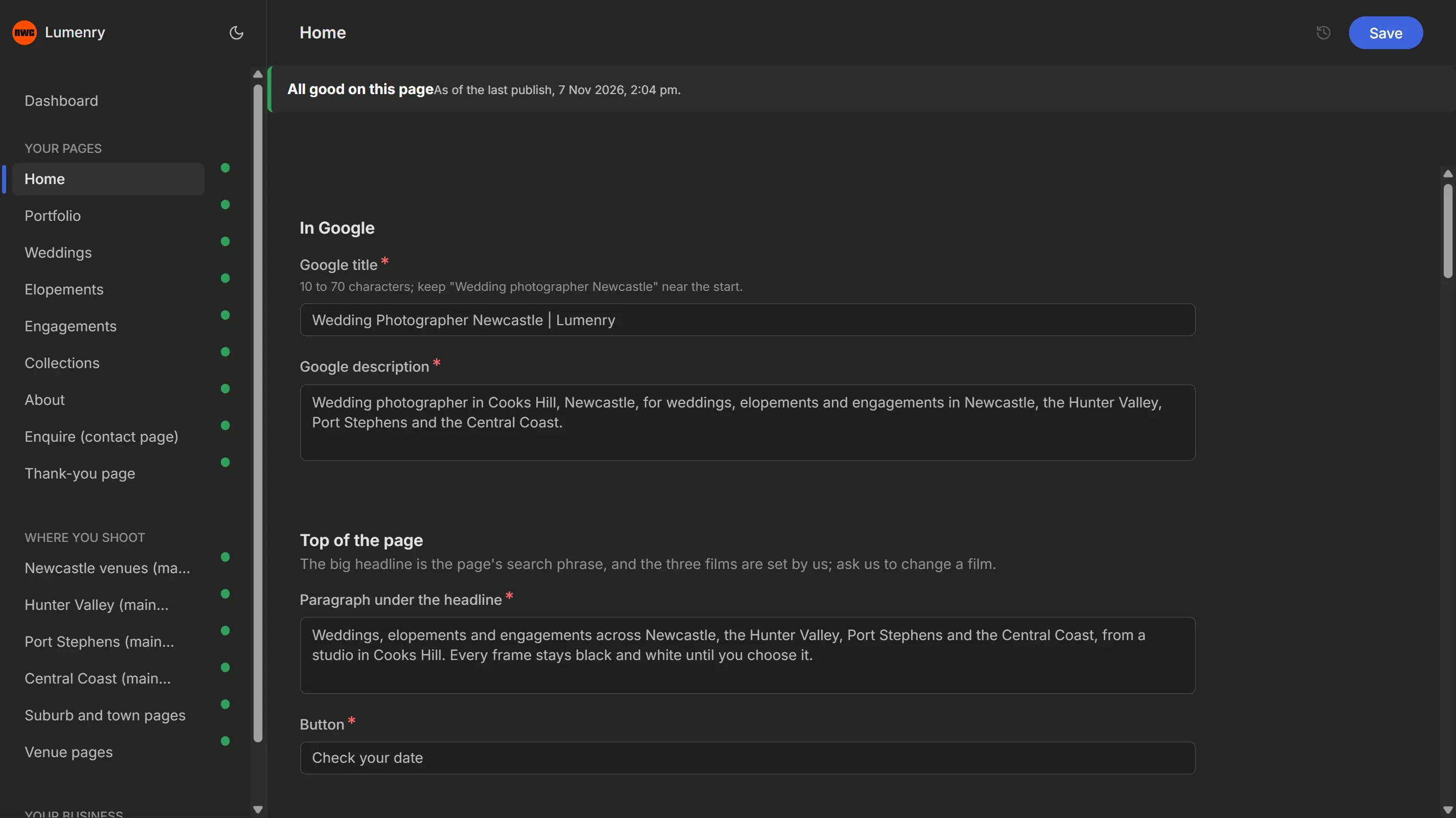
It checks your work as you type. A heading that has lost the word it highlights, a photo that is the wrong shape for its frame, or a description too short for Google is flagged in red and cannot be saved until it is fixed. Every page also carries a small traffic light: green when everything is in order, orange when something is worth a look, like a page that too few other pages link to.
When you press save, a small box says your change is publishing, then that it is live. On our test site that took between 67 and 76 seconds from save to the change being on the public page. If a change ever fails to go live, the box turns red and we are emailed automatically, so a problem never sits unnoticed.
What you can change, and what we look after
The editor gives you the content: your words, photos, opening hours, prices where your site shows them, and your frequently asked questions. New pages, the layout, page addresses and the SEO settings stay with us, and the reason is worth spelling out.
Every page on a site we build is planned around something people type into Google. Its title, its headings, the links between it and other pages, and the behind-the-scenes code Google reads are all set to match that search. Renaming a page breaks every link to it unless a redirect is put in. Moving a section can push the words Google needs below the fold. Deleting a page you thought nobody visited can take a ranking with it. None of that is visible on the day, and you might not notice for weeks. So the CMS gives you control of what the page says, and we look after how the site is put together. If you want a new page or a new section, ask and we build it properly.
What we found when we tested it
Before putting a CMS in every package, we ran it on a full working site, a wedding photographer with 38 pages, and used it the way an owner would. Three things needed fixing before it was ready, and they are the things to ask any developer about.
First, by default the editor saved uploaded photos into a folder the site does not optimise, so a phone photo would have gone out at full size. We set it to save photos where the site resizes and converts them, and the build now refuses a photo that is too small or the wrong shape, with a plain instruction. Second, the editor renames uploaded files with generic names, which throws away a small search signal, so the build puts each photo's descriptive name back. Third, the first rebuilds took six minutes, because the hosting started from scratch each time and re-made every photo size. Keeping those finished sizes between builds brought a save down to about a minute.
We also locked the things that look harmless and are not: the main heading of each page, which carries its search phrase, the names of venue and area pages, which other pages link to by name, and any list with a fixed number of items, such as a row of three services that each has its own page.
Is an Astro site with a CMS right for you?
If you want a fast site that is built to be found in Google, and you would like to change your own words and photos without waiting on anyone, it is a good fit. Most of our clients use it for the small things, a new price, a seasonal photo, a holiday closure, and send us the bigger changes, which their support plan already covers.
If you want to redesign pages yourself, drag sections around and add pages whenever you like, a website builder like Wix or Squarespace gives you that freedom, and you trade away speed and search performance for it. We compared those builders in our builder comparison, and the reasons we build on Astro instead are in our WordPress and Astro guide. Every one of our website packages now includes the CMS, on any support plan.
Written by Newcastle Web Co, web design & seo in Cameron Park NSW 2285. Last updated 7 November 2026.