Search for the best website for photographers and you get lists of website builders, ranked on features and templates. None of them measures what a couple sees when they open a photographer's site on their phone. So we did. We tested 199 real wedding photographers' websites from across Australia on Google's mobile speed test, three times each, and checked the parts of their SEO that decide whether Google can find them. Then we compared them with a photographer's website we built ourselves.
The best website for a photographer is one that shows the photos quickly on a phone and tells Google what the business is and where it works. On that test, no platform's typical site gets there. The typical photographer site we measured scored 61 out of 100 on a phone, its main photo took 8.2 seconds to appear, and only 10 of 199 scored 90 or more. How a site is built mattered more than which platform it was built on. Lumenry, a demo site we built for a made-up wedding photographer, scored 99.
How we tested
We searched Google Maps for "wedding photographer" in 30 Australian cities and wedding regions, from Sydney and Perth to the Hunter Valley, Byron Bay and Margaret River. That gave us 573 photographers' websites. We worked out which platform each one runs on from its own code, never by guessing, and left out the ones Google's test could not load, social media pages, and listings that weren't photographers.
From what was left we drew 30 sites at random for each of the main platforms. Custom-built sites were rarer, so all 21 we could measure went in. Every site went through Google's PageSpeed Insights, the free test Google publishes, on its mobile setting, three times. We kept the middle result, because one run can swing by several points. The tests ran on 3 November 2026. We name no photographer here, only platforms and totals.
The results, platform by platform
The score is out of 100. Google calls 90 to 100 good, 50 to 89 needs improvement, and under 50 poor. "Main photo" is how long the biggest thing on the first screen, almost always a photo, takes to appear on a mid-range phone over mobile data. Google's line for good is 2.5 seconds.
| Platform | Sites | Typical score | Middle half | Main photo | Page size |
|---|---|---|---|---|---|
| WordPress | 30 | 59 | 48 to 64 | 12.6s | 5.0MB |
| Squarespace | 30 | 52 | 40 to 63 | 10.5s | 3.4MB |
| Wix | 30 | 64 | 59 to 74 | 5.9s | 4.3MB |
| Pixieset | 30 | 64 | 53 to 67 | 10.6s | 5.4MB |
| Showit | 30 | 67 | 58 to 74 | 6.4s | 4.4MB |
| Custom code | 21 | 75 | 54 to 84 | 4.6s | 2.0MB |
| Other site builders | 28 | 62 | 51 to 78 | 7.7s | 3.2MB |
| All sites | 199 | 61 | 51 to 71 | 8.2s | 4.0MB |
| Lumenry (our demo) | 1 | 99 | 2.1s | 0.4MB |
Across all 199 sites, 10 scored 90 or more and 47 scored under 50. Only 11 showed their main photo inside Google's 2.5 seconds. Custom-built sites had the best typical score, 75, and also the widest spread: a custom site can be the fastest on the list or nowhere near it. The middle halves overlap from one platform to the next, so we won't crown one. What the numbers do say is that no platform's typical site reaches 90.
Why photographers' websites are slow
It is mostly the photos, and not in the way you might think. A photographer's home page is built to show off pictures, and the typical one we tested sent 1.6MB of images to a phone, inside a page of 4.0MB. On mobile data that weight is the wait. The biggest single picture on a typical page was 310KB.
The platforms split two ways. WordPress and Pixieset sites mostly send the original JPEG files, the format a camera saves in: the typical site on each had none of its pictures in the newer WebP or AVIF formats, which hold the same picture in a smaller file. Pixieset sites carried the most image weight of any platform, 4.4MB on a typical home page. Squarespace and Wix convert photos to WebP for you (97% and 95% of pictures on the typical site), and their typical scores were still 52 and 64. So converting the photos alone doesn't fix it. A builder also sends its own scripts to every visitor, for its editor, its animations and its apps, and a phone has to download and run all of that before the page settles.
A fast photographer's site does three things with its pictures. It sends a phone a picture sized for a phone, not the 6,000-pixel original. It sends the first screen's photo first and everything below the fold later, when the visitor scrolls towards it. And it uses the smaller formats. None of that changes how the photo looks.
The SEO most photographers' sites miss
The basics mostly pass. 99% of the sites had a page title and 84% a description for Google's results, and the typical score on Google's own SEO check was 92. That check only looks at the basics, though. Underneath, three things a photographer needs were missing more often than not.
- One main heading. A page should have exactly one H1, the main heading that tells Google what the page is about, such as "Wedding photographer in the Hunter Valley". Only 43% of the sites we could read had exactly one, and 24% had none at all. A photographer's name in a logo image doesn't count; Google needs it in words.
- Business details for Google. Local business schema is a block of code, invisible to visitors, that tells Google the business name, the area it works in and how to get in touch. 59% of the sites we could read had none. Squarespace builds it from the business details in its settings (86% of its sites had it); WordPress sites mostly didn't (10%). We covered why it matters, and how to check yours, in our LocalBusiness schema study.
- Photo names Google can read. On a typical site, 67% of the pictures had file names like IMG_4821 or a random string of letters. Google Images is where couples find photographers by searching what they want, and a file named hunter-valley-vineyard-wedding-first-look.jpg tells Google what's in it. IMG_4821 tells it nothing.
Headings usually go wrong for an understandable reason. Most website builders put headings in the same drop-down menu as the text styles, and each level comes already styled at a size: Heading 1 is the biggest, Heading 4 is small. So people choose by size. Someone who wants a bigger line of text picks Heading 1, and a page ends up with three of them. Someone who wants smaller text picks Heading 4 for a caption, with nothing above it. To a visitor the page looks fine. To Google, and to a screen reader, the headings are the page's outline, like the chapter titles in a book, and that outline no longer makes sense. Choose the level for the job instead: one Heading 1 for what the page is about, a Heading 2 for each section under it. If the size is wrong, change it in the builder's design or font settings, which changes how it looks and leaves the outline alone.
WordPress has a reason of its own for the missing business details. The SEO plugins most WordPress sites run are free to install and sell the rest as an upgrade, and the local business settings often sit in the paid part. Yoast's free version describes a business to Google as a general organisation; the local business details come with its paid Local SEO features. All in One SEO keeps its local SEO module for its paid plans, and its FAQ schema too, the code that marks up a page's questions and answers for Google. Rank Math is the exception, covering one location for free. So a photographer can have an SEO plugin installed, see green ticks, and still be missing the details Google uses to show them as a local business, which fits the 10% of WordPress sites in our test that had them.
One gap in our data: Pixieset sites turned away our page reader, so we couldn't check their headings or schema. Their scores and speeds come from Google's own test, which they do let in.
What a fast photographer's website looks like
To see what's possible, we built Lumenry, a working website for a made-up wedding photographer in Cooks Hill. It opens on three short films, has a full portfolio, sixteen suburb pages and eight venue pages. It scores 99 out of 100 on the same mobile test, with 100 for accessibility, best practices and SEO.
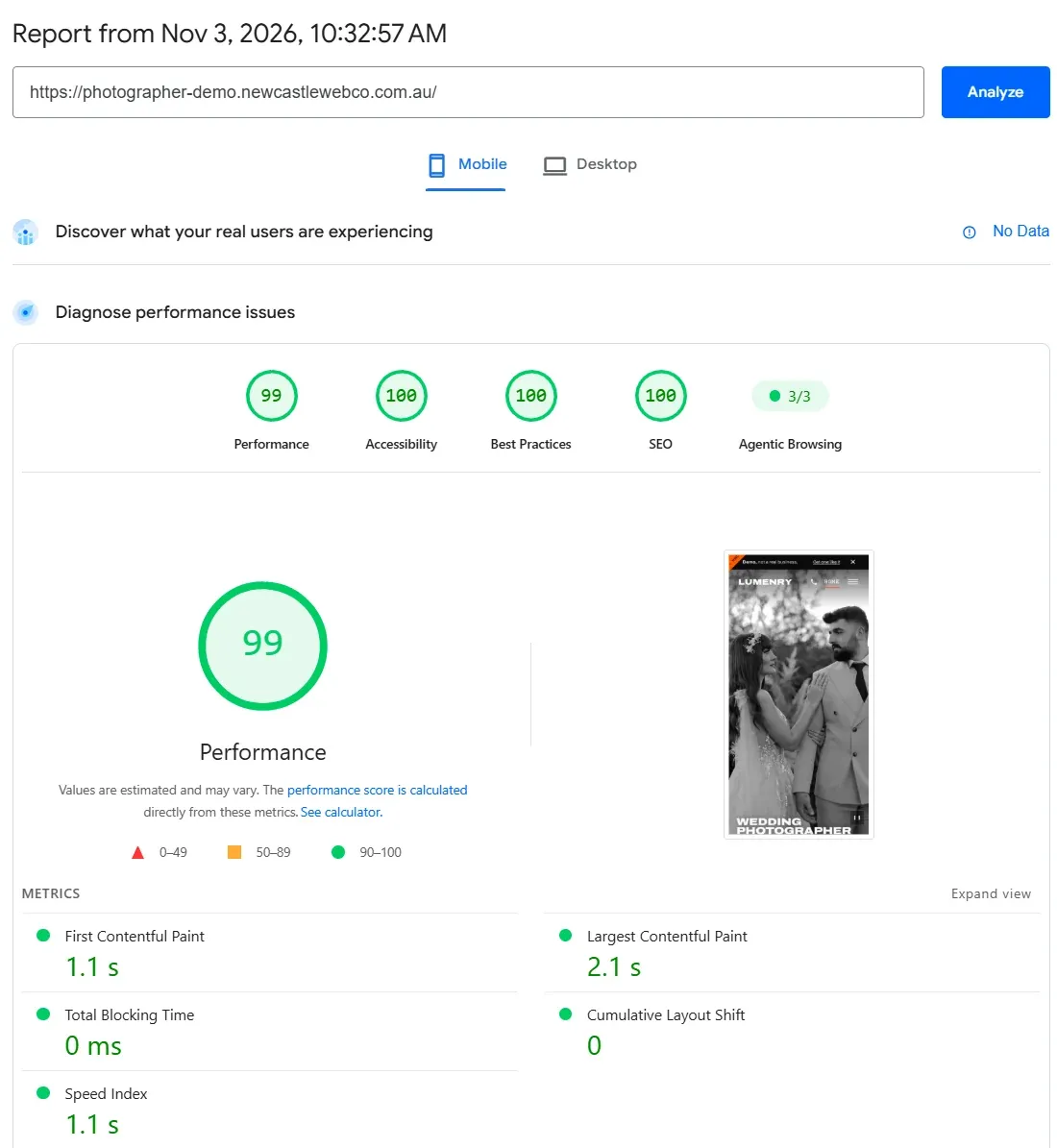
Its home page weighs 0.4MB against the typical photographer's 4.0MB, about 10 times lighter. Its main photo appears in 2.1 seconds. Every picture is in WebP or AVIF, the largest is 87KB, and the films don't start downloading until the visitor scrolls or taps, so the test only weighs their opening frames. That's how a home page with three films stays fast. We explain the trade-offs in should your website have a video background.
Lumenry isn't a one-off. It's one of ten starting designs we've built, working sites for made-up businesses, and every one scores 99 or 100 on the same mobile test (tested between 23 October and 3 November 2026). That includes the four others that open on full-screen film:
- Ember Hill, winery in Pokolbin: 99 out of 100
- Tallbeam Building Co, builder in Merewether: 99 out of 100
- Fernline Landscapes, landscaper in Broadmeadow: 100 out of 100
- Marram Hair, hair salon in The Junction: 99 out of 100
They're all demos, so Google is told not to list them and they never compete with a real business in search. Together they show a site can carry big photos and film and still load fast, when every picture is sized, ordered and named on purpose.
Check your own site in ten minutes
- Open Google's free PageSpeed Insights, paste your home page and read the Mobile tab. Note the score and the Largest Contentful Paint, which is your main photo. Under 2.5 seconds is good.
- Open your home page on your phone over mobile data, not wifi, and count the seconds until your first photo is sharp. That's the wait a potential client sits through before they see any of your work.
- Right-click a photo on your site, open it in a new tab and look at the address. If the file name is a camera number or ends in .jpg at several megabytes, your pictures are going out unsized and unnamed.
- Install SEO Readout, our free Chrome extension, open your home page and click it. It shows your H1 headings, your page title and description, and whether Google can find your business details.
So which platform should a photographer choose?
Pick the platform for how you work. If you sell galleries and prints, a gallery platform earns its keep, and many photographers run their client galleries there and their website somewhere else. If you want to edit everything yourself, a builder lets you. Then hold the site to the test above, because on this evidence the platform doesn't get you a fast site on its own.
If you stay on a builder, the biggest wins are in your hands: export your photos at the size the page shows them, use fewer photos on the home page and more on the gallery pages, name every file for what's in it, and give every page one heading in words. If you want a site that scores 90 or more on a phone and is set up for Google from the first day, that's what we build, at a fixed price, with no templates.
Written by Newcastle Web Co, web design & seo in Cameron Park NSW 2285. Last updated 3 November 2026.